
How to freeze your camera on Zoom
Published 6 November 2026. Last updated 6 November 2026.
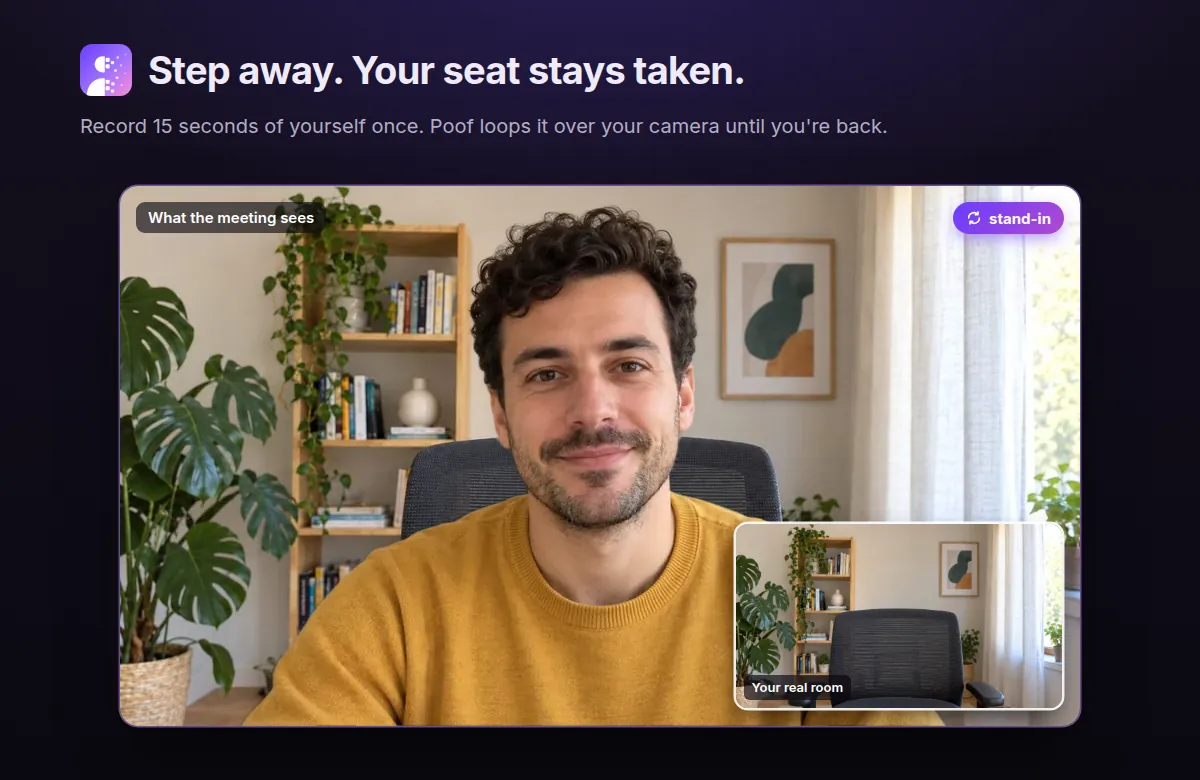
Zoom has no freeze button, so to freeze your camera on Zoom you need a tool between your camera and the meeting. That means a virtual camera app, OBS Studio with an add-on, or a Zoom App. Poof, the Zoom App we make, loops a short clip of you instead of holding a still picture, and there's nothing to download.
What Zoom's own buttons do
Zoom's help page on showing and hiding your video covers Stop Video and Hide Self View. We found no freeze option in Zoom's help pages. Here's what the nearby buttons do:
| Button | What it does |
|---|---|
| Stop Video | Turns your camera off. Others see your name or profile picture instead of your video. |
| Hide Self View | Hides your video from you only. Others in the meeting still see you. |
| Pause Share | Pauses screen sharing, not your camera. |
If your video freezes when you don't want it to, that's a different problem. Start with Zoom's troubleshooting guide for frozen video.
Ways to freeze your camera on Zoom, compared
Every option here except Poof installs something on your computer, usually a virtual camera: software that shows up in Zoom's camera list like a webcam. Details come from each tool's own page, read on 6 November 2026, so check before you buy.
| Tool | What it does | What you install | Works on | Cost |
|---|---|---|---|---|
| OBS Studio | Virtual camera. Freezing takes an add-on or a workaround | Desktop app | Windows 10 and 11, macOS 13 and newer | Free, open source |
| FreezingCam | Freeze or loop | Mac app with a virtual webcam | macOS. Zoom, Meet, Teams, Webex | 7-day trial, then $49 a year |
| CamLoop | Loops a recorded clip. Freeze hotkey in Pro | Mac menu-bar app with a virtual camera | macOS 14 and newer. Zoom, Meet, Teams, Slack | Free for 1 clip up to 10 s. Pro $4.99 a month or $49 once |
| FrostCam | Freeze, or short loops of 3 to 10 s | Mac app with a camera extension | macOS 13 and newer | Free with a watermark. Pro $14.99 once |
| FreezeCam | Freeze. Loops in Pro | Chrome extension, or Windows app with a virtual camera | Browser meetings, Windows 10 and newer | Freeze is free. Pro $7.99 once |
| Poof | Loops a clip of you | Nothing. It's a Zoom App | Zoom desktop on macOS and Windows. Zoom only | Free |
How to choose:
- You also use Teams or Meet: pick a virtual camera app. Poof only works in Zoom.
- You want a true still frame at a key press: FreezingCam, FrostCam and FreezeCam are built for that.
- You don't mind some setup and want it free: OBS Studio.
- You're on Zoom and don't want to install anything: Poof.
Freeze or loop: which looks better?
A still picture is the simplest thing to make and the easiest to misread. Someone who doesn't move for a few minutes looks like a stuck connection, and a colleague may stop to ask if you're still there. That's our view, not a measurement.
A loop keeps you moving, but a plain loop has its own problem: the jump when the clip restarts. Poof plays your clip forwards, then backwards, so it never jumps back to the start. Our guide on how to loop a video on Zoom covers the loop options in detail.
How to freeze your camera with OBS Studio
- Download OBS Studio and add your webcam as a source.
- Set up the freeze. OBS has no one-click option. Forum users describe a third-party freeze filter, or a media source that holds its last frame.
- Click Start Virtual Camera in the Controls dock. On macOS, approve the system extension when asked. On Windows, if it's missing, the OBS troubleshooting page has the fix.
- In Zoom, go to Settings, then Video, and choose OBS Virtual Camera. Forum users say to start it before opening Zoom, and restart Zoom if it isn't listed.
OBS has to stay open the whole time. Some users report lag in Zoom, so try it before a meeting that matters.
How to step away with Poof, with nothing to download
- Add Poof from the Zoom App Marketplace. If your Zoom account is managed by an organization, your admin may need to allow it first.
- Join a meeting with your camera on, click Apps and choose Poof. Allow Camera Mode when Zoom asks.
- Capture the empty room, then record a 10, 15 or 30 second stand-in in your normal browser.
- When the doorbell rings, click Step away or press Ctrl Shift B (Cmd on a Mac). Click I'm back to return to your live camera.
The user guide has the details. Your clip is encrypted on your device before upload and deleted within 24 hours, as the privacy policy explains.
Want a stand-in for the next coffee refill? Poof is free and runs inside Zoom.
Add to ZoomFree. Nothing to download. No account. Zoom desktop on macOS and Windows.
Before you step away
- Say so in the chat. "Back in five" takes two seconds, and for anything longer than a coffee run it's the polite move.
- Mute yourself. A freeze or a loop changes your video, not your audio. Your microphone stays live unless you mute it. Poof can do this for you with Mute me while I'm away, and offers to unmute you when you're back.
- Keep it short. Your stand-in can't answer a question, of course.
When not to use this
Don't use Step away or Vanish where you're required to be present and visible: exams, assessments, identity checks, court or official hearings, or anywhere an employer or organizer requires your live attendance. The same goes for a one-on-one, or any meeting where people are counting on you to answer. Turn your camera off, say you'll be back, and let them see that you've stepped out. See the terms.
Questions
Can you freeze video on Zoom?
Not with a Zoom button, as far as we can find in Zoom's help pages. Stop Video turns your camera off rather than freezing it. To hold a still picture or loop a clip, you need another tool.
Can other people tell my camera is frozen?
Often, if they look for more than a moment. Someone who doesn't move looks like a stuck connection, and you can't answer if they ask you something. Say so in the chat rather than counting on it.
How do I freeze my camera on Zoom on a Mac?
FreezingCam, CamLoop and FrostCam are Mac apps that add a virtual camera, and OBS Studio runs on macOS 13 and newer. Poof loops a clip instead of freezing, and works in Zoom's desktop client on a Mac with nothing to download.
Can I freeze my camera on Zoom on a phone?
The tools on this page are for computers. Poof doesn't support phones or tablets yet, and we didn't find a method for phones that we could verify.
Does freezing my camera mute my microphone?
No. These tools change your video, so your microphone stays live unless you mute it. CamLoop's page says audio passes straight through, and Poof can mute you while you're away if you turn that on.
Why does my Zoom camera freeze on its own?
That's a video problem rather than a feature. Zoom's troubleshooting guide is the place to start.
Poof holds your seat while you get the door. Add it once and it stays in your Apps menu.
Add to Zoom